
Lower your internet bill
61% of people overpay for their internet.
Are you one of them?
Unlock exclusive offers in your area!
Call now
[tel]Enter zip code




















 Use code: KALA & receive a $50 gift card with your order!
 Are you happy with your Internet service?

About the author
You closed on the house. You have the keys, the garage code, and a kitchen full of boxes. What you do not have is internet, and when you typed your new address into a provider’s website, it told you the address does not exist. Uhm, yes it does! We’re standing right here, in the kitchen!
Nothing is wrong with your house or your new address. New construction breaks the assumptions that internet ordering is built on, and almost nobody warns buyers about it before closing (unfortunately). So, let’s get you online this week, and then we will discuss how to get you a long-term connection solution you love.
Lower your internet bill
61% of people overpay for their internet.
Are you one of them?
Unlock exclusive offers in your area!
Call now
[tel]Enter zip code
Moving into a 1970s ranch is easy (or, as easy as moving gets). Someone lived there before you, coax runs to the side of the house, and the provider has a service record at that address going back decades. You call, they flip a switch, you are done.
A new build doesn’t offer that simplicity.
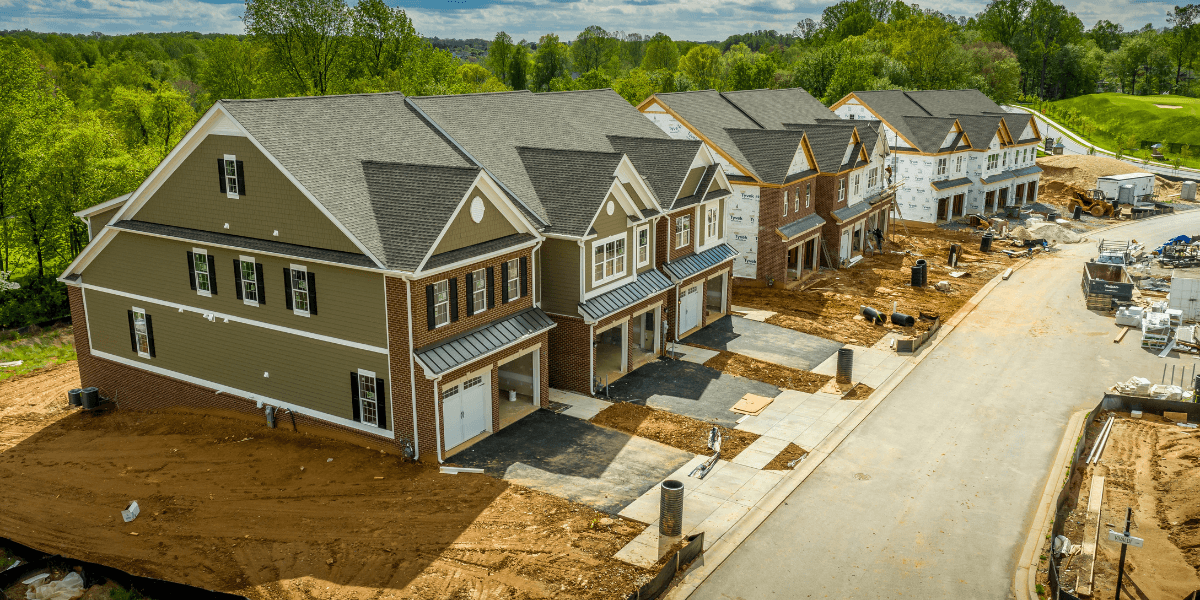
Your address may not exist yet in the systems that matter. Counties assign addresses on their own schedule, and providers pull address data in batches. That gap can run anywhere from 30 to 90 days. During that window, an online order form will tell you “address not found" even when the provider serves every other house on your street.
The neighborhood may have service while your lot does not. Fiber built to serve a development often stops at a distribution point near the entrance. Extending it to each individual home is a separate job on a separate schedule.
Conduit is not cable. Builders love the phrase “fiber ready," and in most cases it means empty plastic pipe was buried from the curb to your utility closet. Empty conduit is helpful, because it means nobody has to trench your new sod. However, it is also not a connection. Somebody still has to pull glass or coax through it.
The FCC broadband map might not show the full picture for internet providers in your area. Providers self-report coverage, and in active construction areas they frequently file claims based on what they plan to build rather than what they have built. This is exactly why the federal program required a formal challenge process where local governments and ISPs could contest reported service levels address by address. If the national map shows three providers at your new home, treat that as a list of leads to call, not a menu to order from.
Online ordering tools query an address database. If your address has not propagated to that database, the tool will fail no matter how good your coverage is. This is the single biggest reason new construction homeowners conclude they have no options when they have several.
Call 1-844-343-1921. When you reach a representative, give them the street address, the subdivision name, the lot number, the builder’s name, and the closest cross street. Then ask them to manually check serviceability rather than running the address through the same online tool you already tried. Internal provisioning systems often show a location as serviceable weeks before the public ordering page catches up.
You can also ask the builder’s sales office directly. They know which providers pulled permits in the development, which ones ran cable during construction, and which homes on which streets are already connected. This is fast and accurate. Ask specifically whether coax, fiber, or empty conduit was run to your lot, because those three answers produce three very different timelines.
Talk to your neighbors. If anyone in the development has been living there for a few months, they have already solved this problem and can tell you exactly which provider showed up and how long it took. The neighborhood Facebook group is a legitimate research tool here (not just a gossip page).
This one surprises people, and it is something to look into before you close. Many new subdivisions have a preferred internet provider arrangement. An internet company pays the developer for the right to serve the neighborhood, then runs its infrastructure during construction while the streets are still open and trenching is cheap. Everyone involved benefits. The builder gets a payment and a marketing bullet point, the provider gets a captive footprint, and the homes get wired at low cost.
What residents discover on move-in day is that only that one company can physically connect to the house.
Federal rules on this are narrow. The FCC has spent two decades restricting exclusive access and revenue-sharing deals in apartment buildings, condos, and other multi-tenant properties, and its 2022 order banned exclusive and graduated revenue-sharing arrangements outright in those settings. Detached single-family homes on individually owned lots generally sit outside that framework. And even where the rules apply, they stop a provider from locking competitors out contractually. They do not obligate a competitor to spend money extending a network to your street. If nobody else has built to your development, you have one provider, and no regulation changes that this year.
So ask the question early, and ask it precisely: which internet providers have infrastructure in this development, and which have a preferred provider agreement with the builder? Vague answers deserve follow-up. Have your real estate agent add it to the pre-closing checklist next to the appraisal and the inspection.
If the answer is one provider and it is not the one you would have chosen, that is a real cost of the house. Plan around it. A competitor extending service to a finished subdivision is a multi-month or multi-year project, not a phone call.
Your options
This is the section to screenshot. Timelines vary by market, but these ranges hold up well across the country.
If coax already runs to the house, you are looking at a standard install appointment, typically one to two weeks out.
If coax does not run to the house yet, the provider has to build a drop from the street to your home first. That means a work order, usually a permit, sometimes a coordination call with the builder, and a crew with a trencher. Budget four to eight weeks, and expect the longer end in fast-growing areas where the same crew is connecting dozens of new homes at once. This timeline is a major source of frustration for people who assumed internet would be waiting for them on closing day.
Fiber installation is a more involved build than a cable drop, and the range is wider.
Where the builder pre-wired and coordinated with the provider during construction, you may get a standard one- to two-week appointment, same as any existing home. Where fiber reaches the development but not your lot, six to sixteen weeks is realistic. Where fiber has not reached the development at all, the honest answer is often twelve to eighteen months, and sometimes longer.
Ask this exact question, because it is the one that separates a real date from a sales answer: has fiber been built to my address, or only to my neighborhood?
This is the fastest path to a connected new construction home, by a wide margin, because nothing has to be built to your house at all.
The gateway ships in a day or two—sometimes you can even DoorDash it same-day. You plug it in near a window, follow the app’s placement guidance, and you are online in roughly fifteen minutes.
T-Mobile currently runs three tiers at standard pricing of $60, $70, and $80 per month, dropping to $35, $45, and $55 with a qualifying voice line, with unlimited data, no contract, and a five-year price guarantee. Verizon’s structure is similar, roughly $50 to $75 standalone and $35 to $60 bundled with a Verizon mobile plan, with multi-year price locks and no data caps.
For this solution, you need to have a good cell signal. 5G home internet performance depends entirely on what your specific address can reach, and a new subdivision on the edge of town may sit at the ragged edge of a sector. Check the coverage map at your exact address before ordering, and take advantage of the trial period to test it in the house.
Starlink solves the same problem as 5G home internet and covers the places 5G does not reach, which makes it the right call for rural and semi-rural new builds.
Order online, hardware arrives in about five to ten days, and self-installation takes under an hour. The standard kit runs $349 to buy outright, and rental is available in some areas at $10 per month after a pricing change in June 2026 that also lifted plan prices by $5 to $10 across the lineup. Entry-level residential service now starts around $55 per month. There is no contract, and there is a 30-day return window.
The tradeoff is the sky. You need a clear view upward, and a wooded lot or a tall neighboring roofline will cause dropouts that no amount of troubleshooting fixes.
Most new construction homeowners face a two- to eight-week gap between move-in day and permanent installation. The mistake is treating that gap as something to endure. Treat it as something to solve in advance for about $60.
All three can be running on move-in day, which means your internet stops depending on someone else’s install queue.

Save this
Share this with the neighborhood group, because everyone in your development is about to have the same week you are having.
Before closing: Ask the builder which providers have infrastructure in the development and which hold preferred provider agreements. Ask whether coax, fiber, or empty conduit was run to your specific lot. Check T-Mobile and Verizon coverage at the exact address, not the zip code. Order 5G home internet or Starlink to arrive on or before move-in day.
The week of move-in: Call 1-844-343-1921. You can speak with our internet specialists about each internet provider you are considering and have them manually check serviceability. After solving your long-term solution, activate your bridge connection so you have an internet connection on day one.
Thirty to sixty days after address assignment: Try online ordering again if you haven’t found a solution. Addresses typically reach ordering systems within 30 to 90 days, and providers who could not quote you a date before will often have a real one now.
Even when online ordering fails for a brand new address, knowing which providers operate in your area tells you exactly who to call and what to ask them. Enter your zip code to see the providers serving your area, then call 1-844-343-1921 to speak with a representative about the options in the area. For a new construction address, a five-minute phone call beats a website every single time.
Because their ordering systems have not received it yet. Counties assign addresses on their own timeline, and providers refresh their address databases in batches, which creates a 30 to 90 day lag. Service availability and address database availability are two different things. Call a representative and ask them to check serviceability manually, giving them the subdivision, lot number, and builder name.
Not with the options recommended here. T-Mobile and Verizon 5G home internet have no contracts and no early termination fees.
[1] Mosaic51.com “Everything you need to know about the BEAD Program"
[2] Shovels.ai “Following the BEAD Money: Where Texas Is Building Homes and Fiber at the Same Time"
[3] InternetProviders.ai “BEAD Funding Tracker 2026: $42.45B by State, Live Updates"
[4] DWT.com “New FCC Rules Affect Broadband Competition in Multi-Tenant Properties"
[5] LegalClarity.org “Apartment Only Allows One Internet Provider: Is It Legal?"
[7] Allconnect.com “Verizon 5G Home Internet | Compare Top Plans and Deals"
[9] Allconnect.com “How to Get Internet Service In a Newly Built Home"
Do you want to leave a review for AT&T Internet?
About the author

Infinity Sales Group, LLC