
Lower your internet bill
61% of people overpay for their internet.
Are you one of them?
Unlock exclusive offers in your area!
Call now
[tel]Enter zip code









 Use code: KALA & receive a $50 gift card with your order!
Are you happy with your Internet service?

About the author
Yes, Starlink works in bad weather, but it has limits you should know before the first big storm of the season. Light rain, clouds, cold temperatures, and ordinary snowfall rarely cause problems—plus, the dish has a built-in heater that melts snow off its surface (pretty handy). Heavy downpours, thunderstorms, deep snow drifts, and extreme winds can slow your connection or knock it offline briefly. Starlink itself says that in extreme cases, heavy rain or wind can lead to slower speeds or a rare outage. If you game online, work from home, or live in a rural area where Starlink is your only real option, the below explains what each type of weather does to your signal, what the dish can and cannot handle, and how to set yourself up for a smooth winter.
[seach_block]
Starlink handles most weather well because its satellites orbit much closer to Earth than traditional satellite internet. SpaceX spent 2026 lowering thousands of its satellites from about 342 miles up to roughly 298 miles. Older satellite services like HughesNet and Viasat use satellites parked about 22,000 miles away, so their signals have a much longer trip through the atmosphere. A shorter trip means less chance of rain and moisture weakening the signal.
Starlink still uses radio waves, and water absorbs and scatters radio waves. Starlink’s support team explains that significant weather can weaken the signal, and that moderate to heavy rain, snow, and hail can cause brief dropouts. The company also notes that storms near its ground stations can affect service, although its laser-linked satellites can route traffic around some storm systems. In most cases, slowdowns end when the weather passes.

What is rain fade?
Your dish talks to satellites using high-frequency radio bands, mainly Ku-band and Ka-band. These frequencies carry a lot of data, which is why Starlink can deliver fast speeds. The trade-off is that raindrops, wet snow, and dense moisture in the air absorb part of the signal before it reaches the dish (engineers call this “rain fade”). The heavier the precipitation, the more signal it absorbs.
Researchers in Germany tracked a Starlink dish alongside weather instruments for 56 days and found that general cloud cover did not significantly affect speed or latency. What mattered was the amount of liquid water in the clouds, which tracked closely with download slowdowns during rain. For a broader look at how storms affect every connection type, our explainer on whether internet speed is impacted by weather covers cable, fiber, DSL, and wireless too.
Yes, and most people never notice a problem during a normal shower, but the answer changes as the rain gets heavier.
Drizzle and steady light rain rarely cause noticeable trouble. You may see slightly lower numbers on a speed test, but streaming, browsing, and video calls should keep running normally. A gray, overcast day with no rain falling is not a reason to worry.
Independent researchers have measured the effect, and the numbers give you a realistic picture. A study in Canada found that precipitation cut Starlink throughput by 27% on average. During heavy rain of more than 4 millimeters per hour, download speeds in that study dropped from about 215 Mbps to roughly 120 Mbps. The same team found that thunderstorms caused outages 420% more frequent and longer than on clear days.
A separate 2025 study from Oulu, Finland, near the Arctic Circle, tested Starlink’s rugged Performance-class dish. Rain reduced median download speed by about 38% and upload speed by about 52%. Even so, service availability stayed above 98.5%, and the researchers saw only a handful of one-second dropouts in moderate rain. In plain terms, heavy rain slows Starlink down, but the connection usually holds.
The Finland study found that rain and clouds didn’t noticeably change round-trip latency, the delay that makes games feel laggy. Your ping should stay fairly steady in the rain. The bigger risk is a brief dropout during a severe thunderstorm, which can kick you from a match or freeze a video call for a few seconds. If you have an important call or ranked match scheduled, glance at the radar first and plan around the worst cells.
Starlink works in snow, and the dish’s design gives it a real advantage over older satellite equipment. The dish has no feed arm or curved bowl for snow to collect in, and it can heat itself to melt snow and ice.
Starlink’s Snow Melt feature uses power to warm the dish’s surface. You control it in the Starlink app under Settings, then Starlink, then Snow Melt, and you can choose from three modes.
Automatic is the default setting. The dish detects snow and heats itself as needed, balancing performance with power use. Pre-heat keeps the dish warm continuously so snow has a harder time building up, and Starlink notes this mode may increase power consumption. Off means the dish never melts snow, which only makes sense in a warm climate or when you need to save battery power.
In Automatic mode, some users report the heater kicks in only after snow starts affecting the signal. Turning on Pre-heat ahead of a forecasted storm lets the dish stay ahead of the snowfall instead of catching up.
Starlink publishes snow melt rates for each dish, and the differences matter if you live in a heavy snow area. According to Starlink’s own specifications, the Standard dish that most residential customers receive melts snow at up to 1.5 inches per hour. The older Performance (Gen 2) dish handles up to 3 inches per hour. The Performance (Gen 3) dish handles up to 3.5 inches per hour and operates down to minus 40°F, compared with minus 22°F for the Standard dish. Starlink recommends the Performance (Gen 3) kit for customers who need higher performance in extreme weather, and it sells that kit through Starlink Business.
Starlink also updates its hardware regularly, so the specs for your exact kit may differ. Check the specifications page in the Starlink app or on Starlink’s website for your model before winter arrives.
If snow falls faster than your dish can melt it, it will pile up. Starlink stated that heavy snow accumulation on top of the dish can affect service. The heater also cannot help if a drift or plowed snowbank rises around a ground-mounted dish and blocks its view of the sky, or if snow slides off your roof and buries the dish. Some users report that even with Pre-heat on, the dish still ends up buried during very heavy snowfall. This is why placement matters as much as the heater does.
Starlink says that icicles and ice buildup generally do not hurt performance. In fact, icicles along the lower edge often mean the heater is doing its job, because melted snow drips off and refreezes at the edge. Starlink advises against using picks, chisels, or other tools to remove ice because you can easily damage the dish. Sleet and freezing rain can still add moisture that weakens the signal for a while, much like heavy rain does, so expect possible slowdowns during an active ice storm.
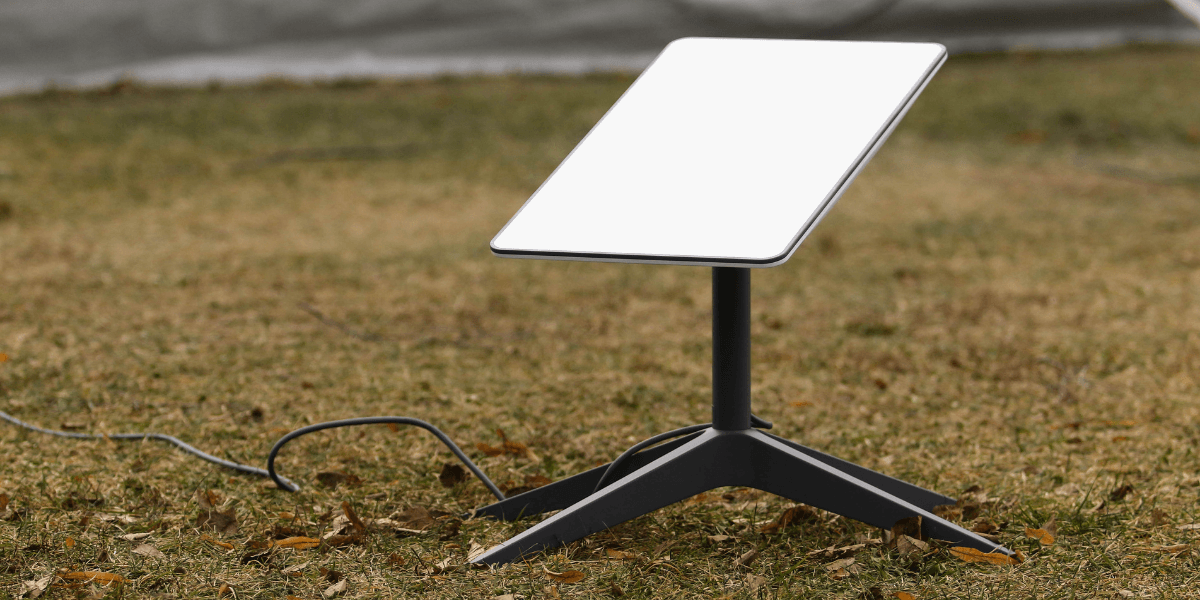
Starlink rates the Standard dish as operational in winds of 60 mph or more. The Standard 4X kit carries a survivable rating of 110 mph or more, and both Performance dishes carry a survivable rating of 174 mph or more. “Operational” means the dish should keep working in that wind, while “survivable” means it should hold up physically without damage.
The dish is only as strong as what holds it, though. Starlink’s own mount guides warn that its mounts are not designed for high winds or hurricane and tornado wind loads, and they recommend tethering in all cases to prevent failure during an unexpected wind event. A loose mount can also let the dish shift slightly in gusts, which can cause dropouts even when the wind is well below the rating. If you are in the path of hurricane-force winds, Starlink recommends bringing the dish and cables indoors if it is safe to do so. If you cannot bring the cable inside, protect the exposed ends from water, and let the cable dry out completely before you reconnect it.
A little preparation in November can prevent most winter headaches. These steps focus on the problems that cause the most outages.
Mount your dish where melted snow can slide off and drip into open space. Avoid spots under a roof edge where sliding snow can land on the dish, and avoid low ground where drifts collect. Starlink recommends installing the dish where snow is unlikely to bury it. A roof mount or a tall pole mount usually beats a kickstand on the ground in snowy climates, because it keeps the dish above drifts and plowed snow.
Use a rigid mount and tether it, especially if you live on open land with strong winter winds. Check the mount before the first storm, because a bolt that loosened over summer can turn a dish crooked in January.
Confirm that Snow Melt is set to Automatic before winter starts. When the forecast calls for heavy snow, switch to Pre-heat a few hours ahead of time. Remember to switch back to Automatic afterward. One Reddit user, quoted by BGR, reported that their dish drew about 110 watts in Pre-heat and dropped to about 35 watts after they switched back to Automatic. That is one person’s experience, but it shows how much Pre-heat can add to your power use if you forget about it.
If snow piles up, brush it off gently with a soft broom or brush, but only if you can reach the dish safely from the ground. Never climb onto a snowy or icy roof to clear a dish, because a fall is far more dangerous than a few hours offline. Skip the shovel, ice scraper, and hot water. Hard tools can scratch or crack the surface, and hot water can refreeze into a thicker sheet of ice. If you cannot reach the dish safely, wait for the heater or the weather to do the work.
Your Starlink dish and router need electricity, and winter storms take out power lines. Starlink lists average power consumption for the Standard dish at 75 to 100 watts, and snow melt mode can push that higher. If you want internet during a power outage, consider a battery backup or a portable power station sized for both the dish and the router, or a generator with a safe outdoor setup. This step matters more than any other if you rely on Starlink for remote work or emergency communication.
Cable and fiber do not suffer from rain fade, so they hold steady through downpours that would slow Starlink. That is a real advantage, which is why wired connections usually win on day-to-day consistency during heavy rain.
Storms knock out wired service too, though, and usually for a different reason. Cable networks need power at your home and at equipment along the line, and wind, ice, and falling trees can snap the lines themselves. When Winter Storm Fern hit the South in January 2026, cable and wireline companies still reported 70,355 subscribers out of service in parts of Mississippi and Tennessee six days after the storm began. After Hurricane Helene in 2024, the number of cable and wireline subscribers without service peaked at about 654,000 in early October.
Power outages hit everyone, regardless of internet type. According to the U.S. Energy Information Administration, the average U.S. electricity customer went without power for 11 hours in 2024, nearly double the annual average of the previous decade. Major events like hurricanes accounted for most of that time. Starlink has one advantage here. If you have backup power, your dish can keep working even when the neighborhood’s wired lines are down, because the signal goes straight to space instead of through damaged poles and cables. With cable, a generator at your house cannot help if the line down the road is broken.
The takeaway is that each connection fails in different situations. Cable tends to win during heavy rain, while Starlink with a battery backup can win after a storm damages local lines. Some households keep both for exactly this reason.
Not every slowdown during a storm comes from the storm. Starlink has had network-wide outages unrelated to weather, including a roughly two-and-a-half-hour global outage in July 2025 that the company blamed on a failure in its internal software services. If your connection drops on a clear day, or if the outage seems to last long after the weather clears, check the Starlink app for a network outage notice. Our guide to Starlink outages and troubleshooting walks you through how to tell a true network outage from a problem at your house.
For many rural households, Starlink is one of the best options available, even in snowy places. The heater, the low-orbit satellites, and the app controls give it a clear edge over older satellite internet in winter. As of November 2026, Starlink’s U.S. residential plans cost $55 per month for Residential 100 Mbps, $85 for Residential 200 Mbps, and $130 for Residential Max, following a price increase in June 2026. Prices can vary by address, so check your location before you order.
If you already have cable or fiber and want a weather backup, Starlink’s Standby Mode keeps your dish active with a slow 500 Kbps connection for basic messaging and email. SpaceX doubled its price from $5 to $10 per month in 2026. That speed will not support streaming or gaming, but it can keep you reachable while your main line is down.
Starlink is a weaker fit if your work depends on a perfectly steady upload during frequent thunderstorms, or if you live somewhere with long stretches of extremely heavy snowfall and cannot mount the dish in a clear, elevated spot. In those cases, pairing Starlink with a second connection gives you the reliability you need.
Every address has different options, and the right choice depends on what is available where you live. Enter your ZIP code below to compare Starlink with the cable, fiber, and fixed wireless providers that serve your area, so you can pick a primary connection or a backup before the first storm arrives.
Lower your internet bill
61% of people overpay for their internet.
Are you one of them?
Unlock exclusive offers in your area!
Call now
[tel]Enter zip code
Usually, no. The dish’s Snow Melt feature handles normal snowfall on its own, and Starlink designed it to reduce the need for manual clearing. You may need to brush the dish off during very heavy snowfall or if drifts block its view of the sky. Only do this if you can reach the dish safely from the ground, and use a soft brush rather than a shovel or scraper.
Yes, you can, but expect slower speeds and possibly brief dropouts during the heaviest part of the storm. Research shows heavy rain can cut speeds by roughly a third or more, while latency tends to stay steady. Starlink’s weather guidance also recommends precautions against lightning and power line surges, so make sure your setup is properly installed and protected.
It depends on the storm. Cable usually holds up better during heavy rain because it does not suffer from rain fade. After storms that damage poles, lines, or local equipment, cable can stay down for days, while Starlink keeps working as long as your dish has power. Many rural households find that Starlink with a battery backup gives them the best chance of staying connected through winter.
[1] Starlink.com “I live in an area with snow, heavy rain, wind, lightning, or extreme temperatures – can I still use Starlink?”
[2] Starlink.com “How does weather impact my service?”
[3] Starlink.com “How does the Starlink Performance (Gen 3) Kit compare to previous versions?”
[4] Starlink.com “How do I adjust snow melt mode?”
[5] Starlink.com “How does Starlink handle snow and ice?”
[6] Starlink.com “Starlink Specifications”
[7] Shop.Starlink.com “Ground Pole Mount Guide”
[8] arXiv.org “Impact of Weather on Satellite Communication: Evaluating Starlink Resilience”
[9] arXiv.org “LEO Satellite Network Access in the Wild: Potentials, Experiences, and Challenges”
[10] arXiv.org “Dynamic Factors Affecting Link Quality in LEO Satellite Communications: A Starlink Case Study”
[11] BGR.com “Starlink Has A Clever Solution For Harsh Winters That More ISPs Should Use”
[12] InterestingEngineering.com “Starlink to lower thousands of satellites in 2026 to ease crowded Earth orbit safety”
[13] EIA.gov “Hurricanes in 2024 led to the most hours without power in the United States in 10 years”
[14] FCC.gov “Communications Status Report for Areas Impacted by Winter Storm Fern”
[15] TechCentral.co.za “Starlink suffers rare global outage”
[16] KeepTrack.space “How Much Does Starlink Cost in 2026? Plans, Hardware and Fees”
[17] TheNextWeb.com “SpaceX raises Starlink prices across every consumer plan and doubles the cost of Standby Mode”
Do you want to leave a review for AT&T Internet?
About the author

Infinity Sales Group, LLC